Integration: Kaseya SIEM and HaveIBeenPwned (Pwnd Monitor)
 Security and navigation
Kaseya SIEM
NAVIGATION Organizations > Edit Organization (pencil icon) > Applications tab > + New Application > Dark Web Monitoring > Pwnd
PERMISSIONS Permission to manage integrations or organization applications in Kaseya SIEM
HaveIBeenPwned
NAVIGATION Dashboard > Business > API Key
PERMISSIONS An active HaveIBeenPwned subscription (API Key provisioning requires an active subscription)
Overview
Kaseya SIEM integrates with HaveIBeenPwned (displayed in the connection wizard as "Pwnd Monitor") to check email addresses and domains against HaveIBeenPwned's database of known data breaches and credential compromises. This integration allows Kaseya SIEM to automatically flag compromised accounts, giving the security team visibility into exposed credentials across the organization.
NOTE HaveIBeenPwned's own website displays its full name as "Pwned," but the Kaseya SIEM integration tile and connection wizard consistently label it Pwnd. This is a naming inconsistency between the two products, not a typo.
Prerequisites
-
Access to the email address you'll use to sign in to HaveIBeenPwned (sign-in is passwordless; a login link is emailed to you)
-
An active HaveIBeenPwned subscription (the free account shown in the Dashboard cannot provision an API key)
-
A HaveIBeenPwned API Key
-
Permission to manage integrations or organization applications in Kaseya SIEM
-
If using Domain mode: verified ownership of the domain in the HIBP domain dashboard
How to...
Get your API Key in HaveIBeenPwned
To generate the credentials Kaseya SIEM needs, complete the following steps:
-
Go to the HaveIBeenPwned Dashboard Sign In page.
-
Enter your email address and click to receive a sign-in link.
-
Check your email and click the sign-in link to access your Dashboard.
-
From the side navigation menu, under Business, click API Key.
-
If you see the message "You need an active subscription in order to provision an API key," upgrade to an active subscription before continuing. The free account (shown after passwordless sign-in) does not include API key provisioning.
-
Once subscribed, generate and copy your API Key, and save it to a safe, encrypted location.
NOTE Due to rate-limiting on the API, only one API Key is needed if you intend to monitor fewer than 43,000 email addresses.
Set up the integration in Kaseya SIEM
-
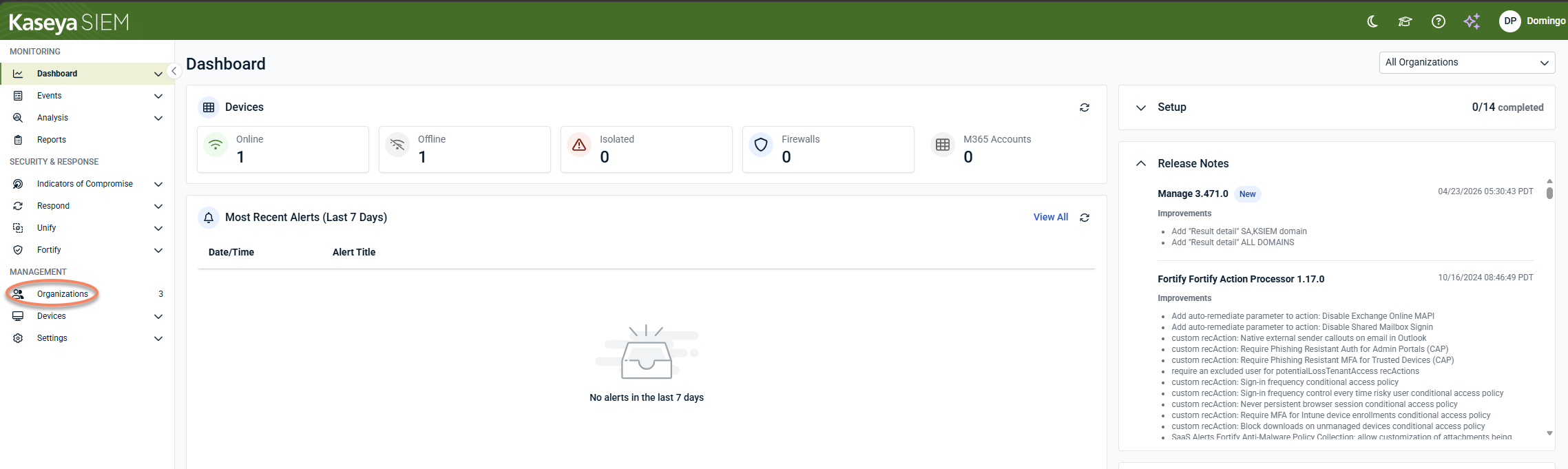
In Kaseya SIEM, from the side navigation menu, go to Organizations.
-
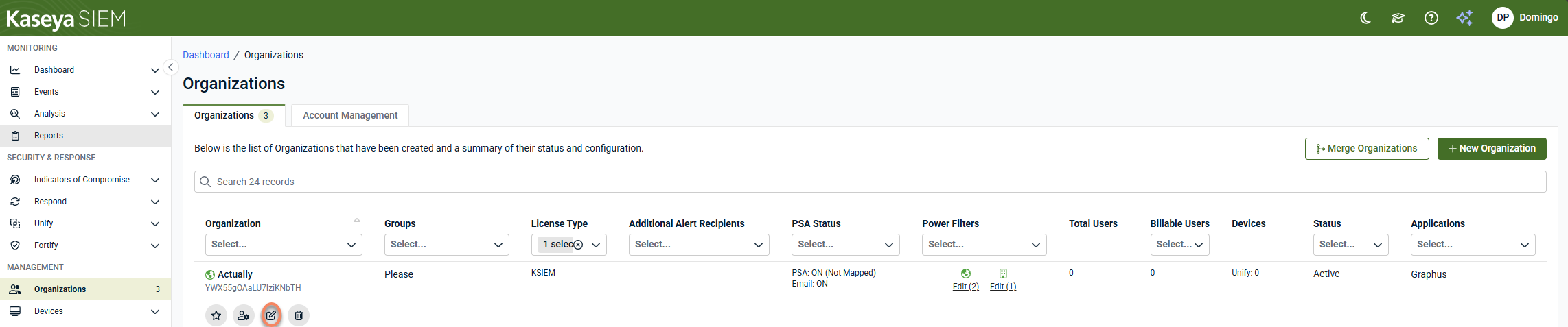
Click Edit Organization (pencil icon) for the organization you want to connect Pwnd Monitor to.
-
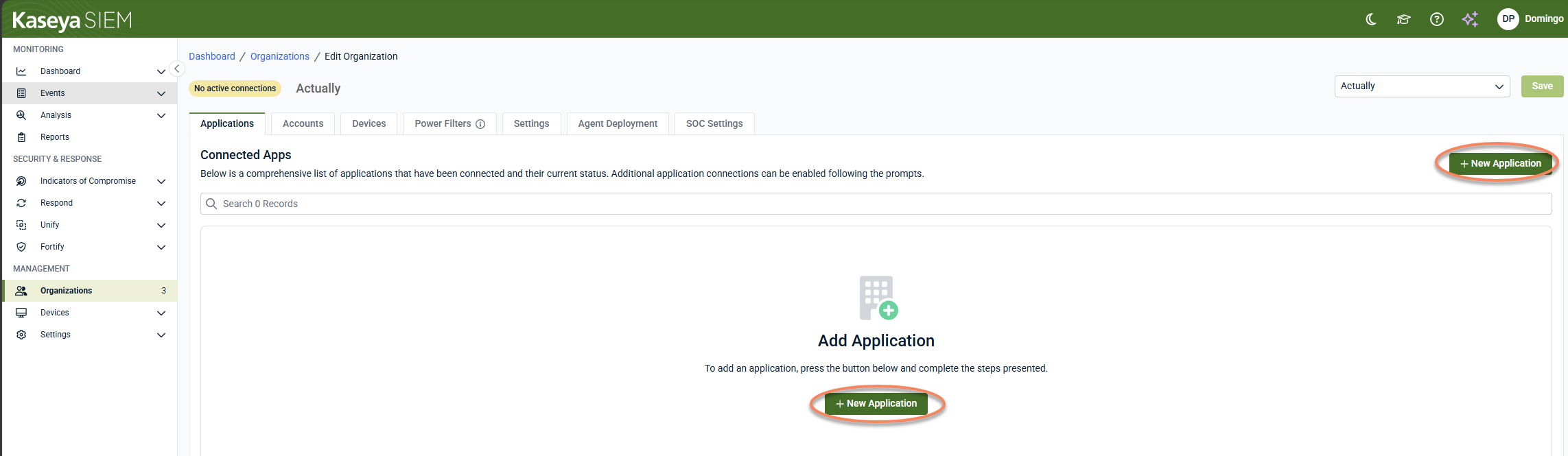
In the Applications tab, click + New Application.
-
Under Dark Web Monitoring, locate Pwnd and click Connect.
-
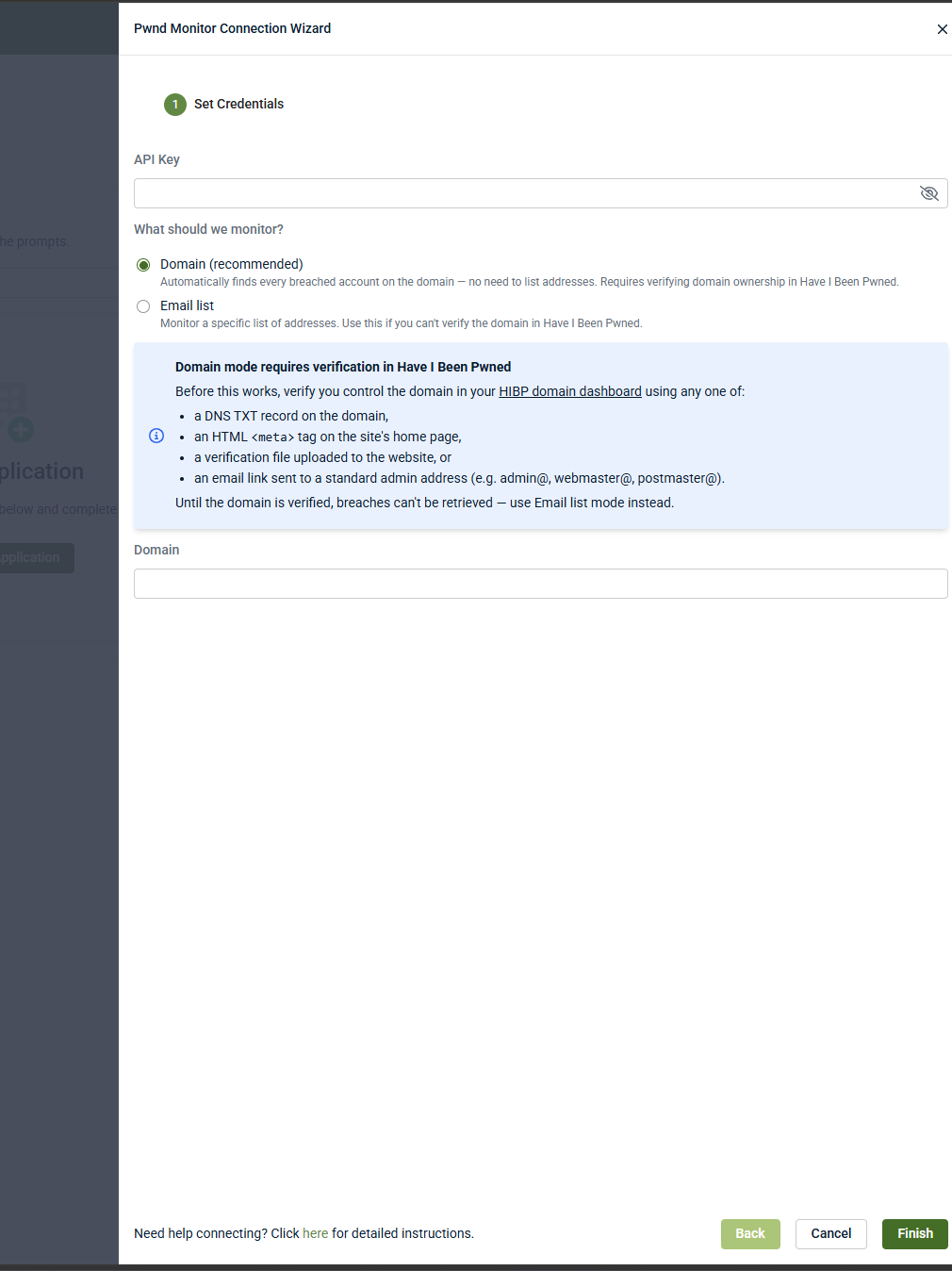
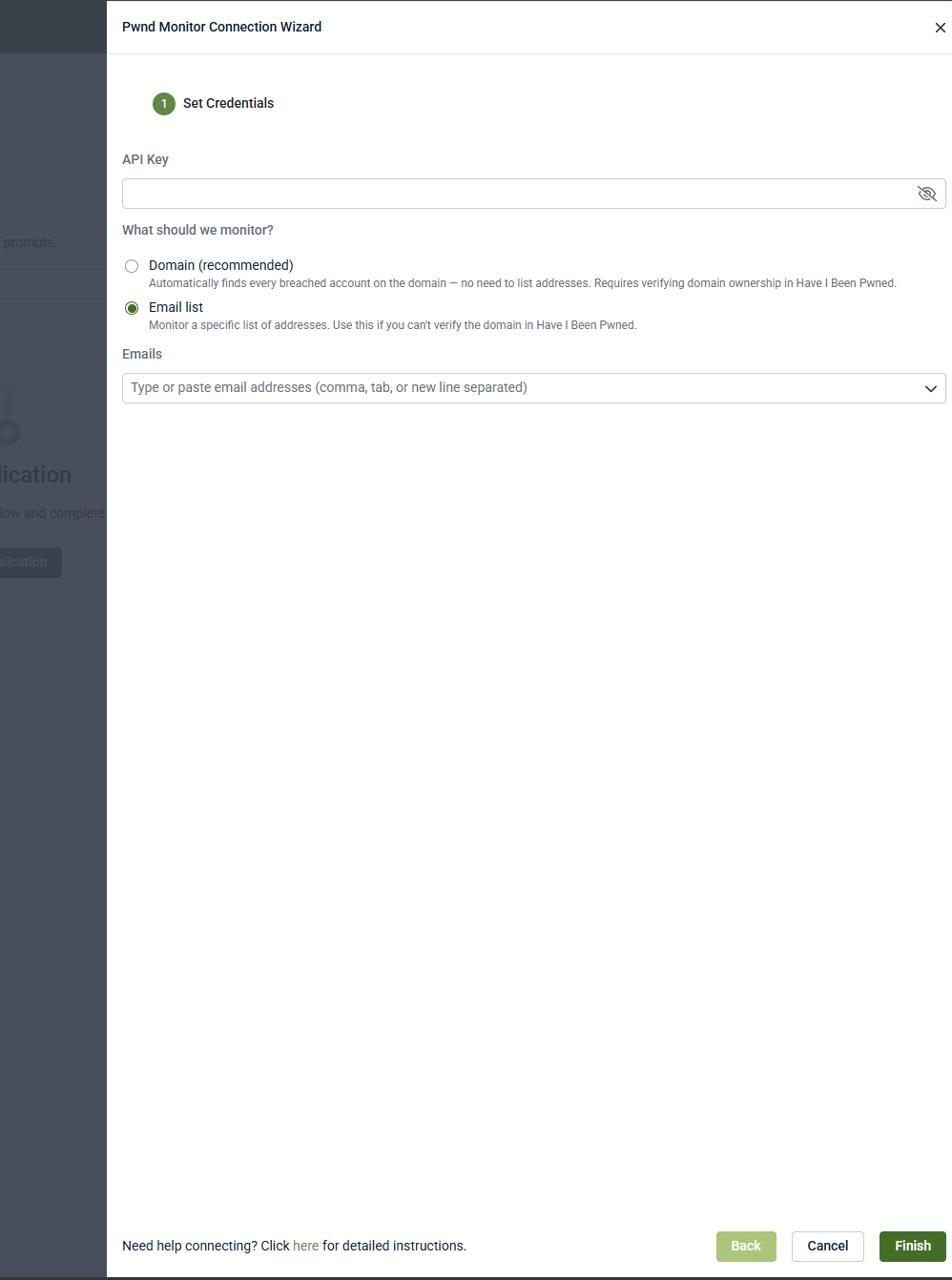
In the Pwnd Monitor Connection Wizard, on the Set Credentials step, enter your API Key.
-
Under What should we monitor?, select one of the following:
-
Domain (recommended): automatically finds every breached account on the domain; no need to list addresses. Requires verifying domain ownership in HaveIBeenPwned. Enter the domain in the Domain field.
-
Email list: monitors a specific list of addresses. Use this if you can't verify the domain in HaveIBeenPwned. Enter the addresses in the Emails field (comma, tab, or new-line separated).
-
-
Click Finish.
The Pwnd application appears under the organization's Applications tab.
NOTE If Domain mode is selected but the domain hasn't been verified in HaveIBeenPwned, breaches can't be retrieved. Verify ownership of the domain in the HIBP domain dashboard using a DNS TXT record, an HTML meta tag on the site's home page, a verification file uploaded to the website, or an email link sent to a standard admin address (e.g., admin@, webmaster@, postmaster@), or use Email list mode instead.
Disable the integration in Kaseya SIEM
To disable the integration, complete the following steps:
-
From the side navigation menu, click Organizations.
-
Click Edit Organization (pencil icon), and the Applications tab will be displayed.
-
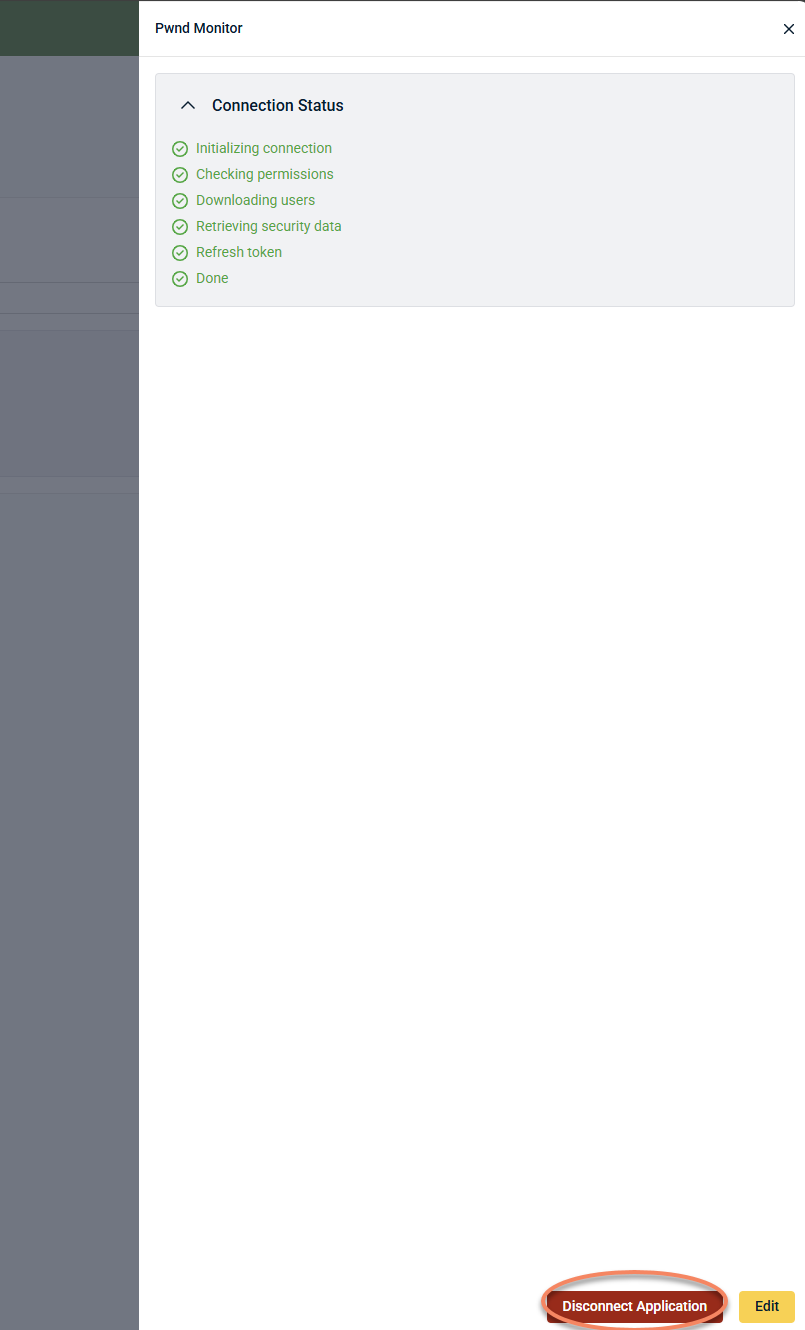
Click the Pwnd tile.
-
Select Disconnect Application.
-
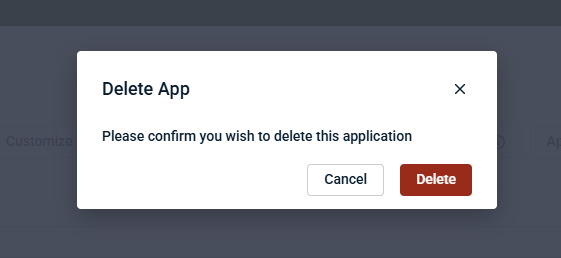
Confirm the action.
Kaseya SIEM stops receiving data from HaveIBeenPwned.
FAQ
What credentials are required for the integration?
Only your HaveIBeenPwned API Key. You'll also choose whether to monitor a verified domain or a specific list of email addresses.
Do I need a paid HaveIBeenPwned subscription?
Yes. An API key can only be provisioned with an active subscription; a free account will show a message stating an active subscription is required.
What's the difference between Domain mode and Email list mode?
Domain mode automatically finds every breached account associated with a verified domain, with no need to list individual addresses. Email list mode monitors only the specific addresses you provide, and is the option to use if you can't verify domain ownership in HaveIBeenPwned.
How do I verify domain ownership?
In the HIBP domain dashboard, verify using any one of: a DNS TXT record on the domain, an HTML meta tag on the site's home page, a verification file uploaded to the website, or an email link sent to a standard admin address (e.g., admin@, webmaster@, postmaster@).
Are there limits on how many addresses I can monitor?
Due to API rate-limiting, a single API Key supports monitoring fewer than 43,000 email addresses.
Does disabling the integration affect my HaveIBeenPwned account?
No. Disabling the integration stops data ingestion into Kaseya SIEM but does not change your HaveIBeenPwned subscription or configuration.
How do I sign in to HaveIBeenPwned?
Sign-in is passwordless. Go to the Dashboard Sign In page, enter your email address, and click the link sent to your inbox to access your Dashboard.


